Interactive Wythoff Polyhedra Explorer — User Guide
Construct, morph, verify, import, and export uniform & star polyhedra directly on the sphere.
1. Quick Start
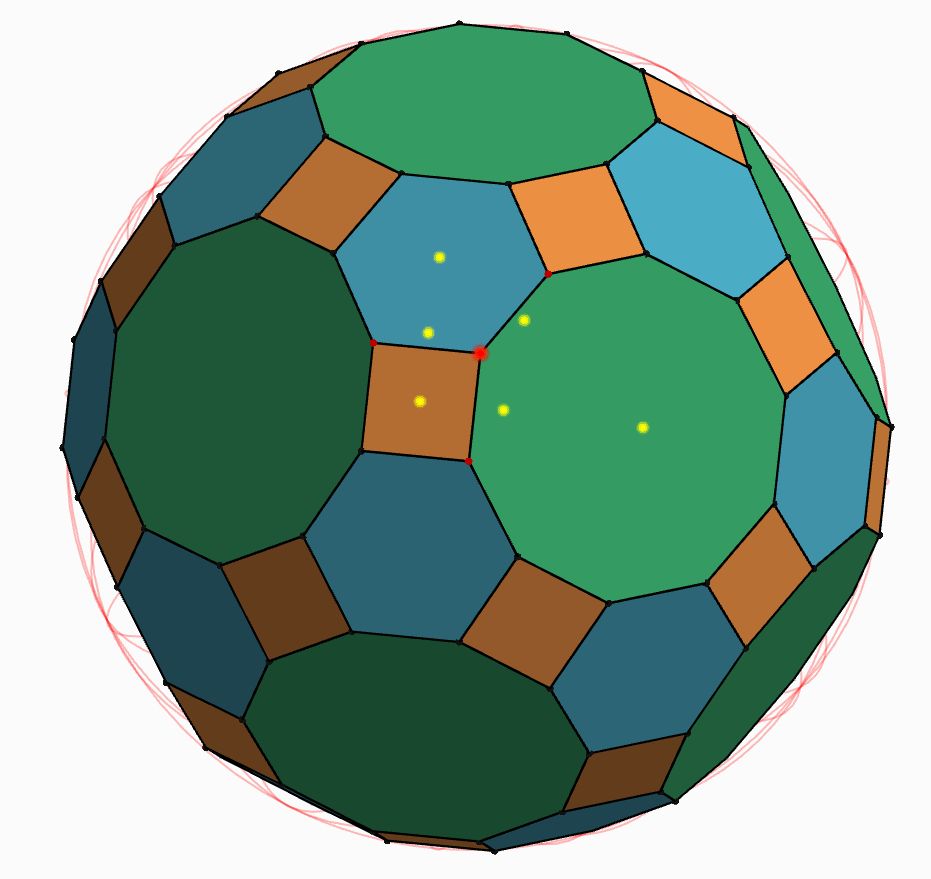
Wythoff's construction builds polyhedra by placing a single generator vertex—the Red Point of Interest (POI)—inside a spherical right/general triangle called a Schwarz triangle, then reflecting it across the triangle's three mirrors.
- Choose a symmetry family from the Preset dropdown (the explorer starts on
Icosahedral μ=1 (5, 3, 2)). - Drag the Red Dot inside the bright red primary Schwarz triangle with your Left Mouse Button to morph the polyhedron continuously in real time.
- Release near any Yellow Dot (or Green Dot in Snub Mode) to snap cleanly onto a uniform Platonic, Archimedean, Kepler-Poinsot, or uniform star polyhedron.
- Drag anywhere with your Right Mouse Button (or Shift + Left Drag) to rotate the 3D model.
2. Mouse, Trackpad & Touch Controls
.off or .coff file directly onto the 3D viewport to load it immediately.
3. Visual Markers & Face Colors
Interactive Dots & Grid
-
Red Point of Interest (POI): Your active generator vertex. Every vertex of the polyhedron is a symmetry copy of this point.
-
Yellow Target Dots: The 7 mirror/corner intersection points (3 corners, 3 edge points, and 1 central incenter) corresponding to uniform polyhedra. Moving close to one snaps to it automatically.
-
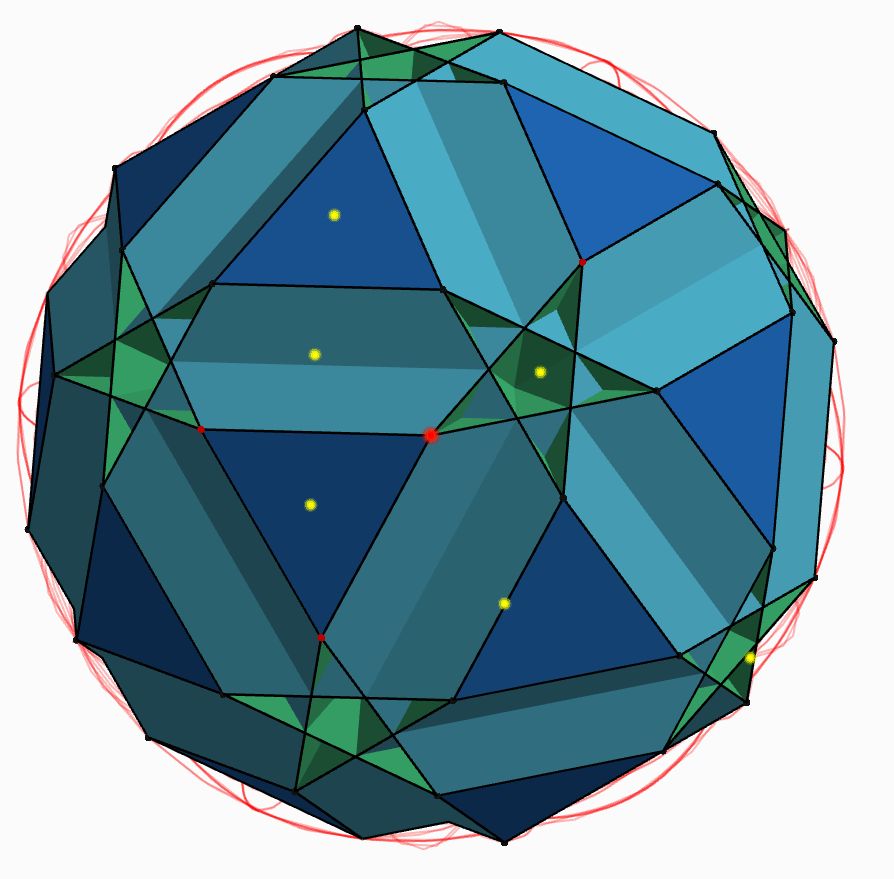
Green Snub Target Dot: Appears only when Snub Mode is active. Snaps to the exact barycentric position that yields equilateral snub faces.
-
Small Dark-Red Dots: The three direct mirror reflections of the Red POI across the primary triangle's sides.
-
Red Spherical Grid (Schwarz Triangles): The bright red outline marks the primary fundamental domain; faint red triangles show its reflected copies covering the sphere.
Polygon Face Color Coding
4. Symmetry Groups, Parameters & Wythoff Symbols
Symmetry Presets & Custom (p, q, r)
The Preset selector provides Tetrahedral, Octahedral, Icosahedral (including higher-density μ star triangles), and Dihedral symmetry groups.
To test any custom spherical triangle, type integers or fractions (such as 5/2, 4/3, 7, 2) into the p, q, and r fields and press Enter or click Set.
Reading the Active Wythoff Symbol
When the Red POI sits on one of the target dots, the top panel shows its Wythoff symbol in red and its official name. When dragged away from target points, it displays the POI's flat barycentric coordinates (w1, w2, w3).
| Symbol Form | POI Position | Resulting Vertex Configuration |
|---|---|---|
q | p r | On corner opposite mirror q | (p . r)^q (e.g., 3 | 5 2 → Dodecahedron) |
q r | p | On mirror edge opposite corner p | q . 2p . r . 2p (e.g., 3 5 | 2 → Small Rhombicosidodecahedron) |
p q r | | At the triangle incenter | 2r . 2p . 2q (omnitruncated, e.g., 5 3 2 |) |
| p q r | At the Green Snub target (Snub Mode) | 3 . r . 3 . q . 3 . p (chiral snub polyhedron) |
5. Display Options, Extended Mode & Snub Mode
- Display Polyhedron Faces / Edges / Vertices: Independently toggle solid shaded faces, black front / faded back wireframe edges, and vertex dots.
- Display Projected Schwarz Triangles: Toggle the spherical mirror triangle grid.
- Extended Mode (Unclamped POI): Removes the primary triangle boundary clamp so you can drag the Red POI anywhere across the sphere. Near mirror intersections it gently snaps to coincident vertices to reveal compounds, crossed faces, and exotic stellations.
-
Snub Mode (Rotational Subgroup): Uses only proper rotations (half the full reflection group) and inserts alternating snub triangles.
Note: Snub Mode automatically deactivates if you drag the POI directly onto a mirror edge or a non-central yellow target dot. Move the POI strictly inside the triangle (or onto the Green Dot) to see the snub polyhedron.
6. Import, Export, Vertex Figure Resolver & Verification
Polyhedron Details & Live Verification
- Vertex Configuration: Lists the polygons meeting around a single vertex in cyclic angular order (e.g.,
4 . 6 . 10). - Verification Status: At uniform target
points, the program compares the geometrically generated vertex figure
against the theoretical Wythoff configuration and displays VERIFICATION: PASS or
FAIL. - Face Counts: Summarizes how many triangles, squares, pentagons, pentagrams, etc. make up the current model.
Export Polyhedron (OFF)
Generates a clean .off file with deduplicated
vertices (formatted to 16 decimal places), face index lists, and exact
edge counts, and downloads it directly in your browser.
Import OFF / COFF (Uniform & Noble Polyhedra)
Click Import OFF / COFF or drag a file onto the canvas:
- If the mesh's vertex figure strictly matches a built-in uniform preset, the explorer automatically switches to that Wythoff preset and target dot.
- If it is a custom or Noble polyhedron
(face-transitive and vertex-transitive, not directly
Wythoff-constructible), the program tessellates any self-intersecting
star faces, aligns the mesh to the closest
tetrahedral/octahedral/icosahedral symmetry group, preserves any COFF
face colors, and displays
MODE: NOBLE. (POI dragging and Snub Mode are disabled while viewing a static Noble mesh; choose any Preset to return to interactive Wythoff mode.)
Resolve Vertex Figure
Enter a vertex configuration such as 3 5 3 5, 3.5.3.5, 4 6 8, or 5/2 3 3 3 3 in the text box and click Resolve (or press Enter) to automatically find the matching (p, q, r) parameters, Snub setting, and target point.
Composite Check
Runs an automated verification sweep across every preset and every
uniform/snub target point, displays the pass summary, and downloads a wythoff_composite_check.csv report.